Free · open source · offline

Diagnose and fix your own BMW

Read the faults and dash warnings stored in your E-series BMW, find out what they mean, and test a part before you buy it. It runs offline on your own laptop with a K+DCAN cable. Free, with no account, and nothing leaves your computer.

Download .ZIP
> scoop bucket add klemme15 https://github.com/Expos-AI/Klemme15; scoop install klemme15

Windows, macOS, LinuxGPL-3.0Not affiliated with BMW AG

Beta. Validated on a 2006 E90 325i: will it work on my car?

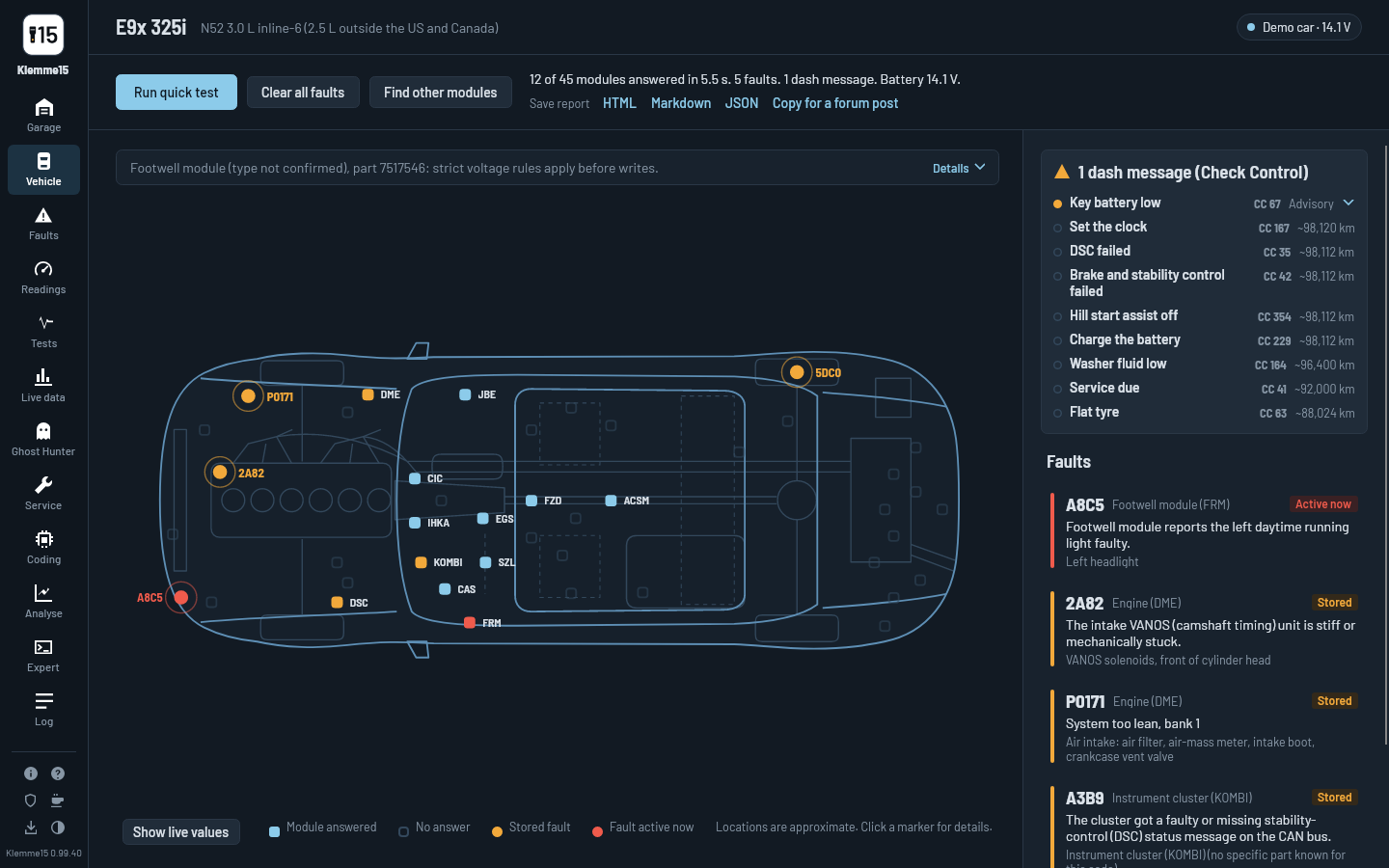
Klemme15 after a quick test of an E90 325i: every module on a top view of the car, with its faults and dash messages

Will it work on my car?

Klemme15 is built for BMW's E-series. Find your chassis code on the sticker in the door jamb or on your registration (the 2008 5 Series is an E60, for example).

ChassisYearsModelsCable switchStatus
E90 · E91 · E92 · E933 Series2006-2013316i-335i, 325xi-335xi and xDrive, 335is, 335d, M3, 316d-330dD-CANValidated
E81 · E82 · E87 · E881 Series2007-2013116i-130i, 135i, 135is, 1M, 116d-123dD-CANLike the E90 family · validation in progress
E60 · E61 · E63 · E645 Series, 6 Series2007-2010523i-550i, 525xi-535xi and xDrive, 520d-535d, 630i, 650i, 635d, M5, M6D-CANLike the E90 family · validation in progress
E70 · E71X5, X62007-2014X5 3.0si-xDrive50i, xDrive30d-40d, X5 M, X6 35i-50i, 30d-40d, X6 MD-CANLike the E90 family · validation in progress
E84X12009-2015sDrive18i-xDrive35i, 20i, 18d-23dD-CANLike the E90 family · validation in progress
E89Z42009-2016sDrive18i-35isD-CANLike the E90 family · validation in progress
E463 Series1999-2006316i-330xi, 323Ci-330Ci, Compact, M3, 318d-330dK-lineEngine and identification · validation in progress
E395 Series1997-2003520i-540i, M5, 520d-530dK-lineEngine and identification · validation in progress
E53X52000-20063.0i-4.8is, 3.0dK-lineEngine and identification · validation in progress
E85 · E86Z42003-20082.0i-3.0si, Z4 MK-lineEngine and identification · validation in progress
E83X32004-20062.0i-3.0i, 2.0d, 3.0dK-lineIn development: engine over OBD-II, modules being mapped
E387 Series1995-2001728i-750iL, 730dK-lineEngine and identification · validation in progress
E363 Series1996-1999318i-328is, 318ti, M3K-lineIn development: engine over OBD-II, modules being mapped · E36 tester guide
  • D-CAN cars (2006 on) get, without BMW files: every module's faults and dash messages, engine readings and live data, the guided tests except the water pump sweep, coding backups, battery registration (most engine computers) and Valvetronic learning (N52 engines only). Your own BMW files (EDIABAS mode, Windows) add every module's readings, the other service functions and BMW's fault texts.
  • K-line cars (E46 and older) get module identification, engine faults, live data, health history and the fuel trim test out of the box; every module's full fault memory needs your own BMW files (EDIABAS mode, Windows).
  • E60 / E61 / E63 / E64 and E8x built before March 2007 have no D-CAN and need EDIABAS mode. F- and G-series (Ethernet) aren't supported yet.
Diagnose

Find out what's wrong, in plain English

Plug in, press one button, and Klemme15 asks every module in the car for its faults, then tells you what each one means and whether it needs fixing.

  • Quick test of every module. Finds every fitted module with one broadcast, reads its part number and fault memory. 45 E90-family modules, 23 E46 modules.
  • One cause, not many. Faults across modules that belong together are grouped: one low-voltage event, several modules that lost contact with the same one, or faults from the same mileage.
  • Every code explained. 203 E90-family BMW codes researched in our own words with sources (and shown on other families where the module is the same version), all 2,066 standard OBD-II codes, and BMW's own text for your exact module when you have your BMW files.
  • Sorted by what matters. Fix now, worth checking, or background, so ten codes don't turn into ten parts.
  • Why the triangle is lit. 396 dash (Check Control) messages decoded, even when no module has a fault code.
  • The car's story. The instrument cluster remembers its last warnings with the mileage; Klemme15 tells them as a timeline: a puncture here, a battery dip there.
  • Clear faults, Shadow / Info memory included. Per module or the whole car, and Klemme15 shows which ones come straight back.
  • See where it is. A top view of the car with each fault pinned to the part it points at.
Demo car, recorded from the app
Test

Test the part before you buy it

Guided tests tell you what to do (idle, hold 2,500 rpm, blip the throttle), graph what the engine does, and finish with a plain verdict.

  • Fuel trim test. Lean at idle but fine at 2,500 rpm is a vacuum leak; lean everywhere is fuel delivery or the air mass meter.
  • Start from a symptom. No code, or no idea where to begin? Pick what the car does and get what it already reports, then what to do in order.
  • Vacuum leak hunter. A diagnostic chain that measures your fuel trims, asks you to lift the oil filler cap, and points to the crankcase vent valve or the leak.
  • VANOS, cylinder roughness, water pump. Target against actual, cylinder by cylinder, requested pump speed against real speed.
  • Rough idle and air conditioning. Idle with the air conditioning off, then on: does the idle hunt, does it chug when the compressor engages, does one cylinder falter under the load, or is the engine fine and the shake coming through the mounts.
  • Charging system check. Battery at rest, alternator at idle and under load: a tired battery or a weak alternator?
  • Why won't it start? Battery, cranking and the start-chain faults, routed to a cause.
  • How to check it. Multimeter and swap checks under matching faults: connectors, grounds, VANOS solenoids, coils, sensors.
  • Readings and live data. Engine values out of the box, every module's values with your BMW files. Live graphs, CSV recording and an Analyse page to replay a log.
  • Garage mode. A high-contrast theme, black on white with larger small print, for a laptop on the fender in daylight.
Demo car, sped up, recorded from the app
Service functions

Do the workshop jobs yourself

Service functions check the car first, ask you to confirm each requirement, run BMW's own procedure for your module version and show the result. Battery registration (on most engine computers) and Valvetronic learning (N52 engines with MSV70 or MSV80 engine computers only) work over the cable alone; the rest use your own BMW files (EDIABAS mode, Windows).

  • Battery registration. After fitting a new battery. Validated on an E90.
  • Service reminders. Oil, brake pads, brake fluid, microfilter, spark plugs, vehicle check.
  • Engine. Adaptation reset, Valvetronic and DISA learning, cylinder cut-out test, fuel tank leak test, VANOS flush.
  • Component tests. Radiator fan, fuel pump, thermostat, electric water pump, throttle, DISA flap, purge valve.
  • Steering lock. Red steering wheel on an early E90 with a key slot? Clear the lock's event counters after charging the battery, the reset owners ask for most. Keys and immobiliser data are never touched.
  • Brakes, DSC and steering. Steering angle calibration, ABS unit bleeding, flat tyre monitor reset, wheel speed sensor test.
  • Gearbox, xDrive and diesel. Automatic gearbox adaptation reset, SMG learning, xDrive relearn, glow plugs, EGR, injector codes.
  • Body. Windows, sunroof, climate flaps, rain sensor, and restarting a frozen iDrive, Bluetooth or amplifier without pulling the battery.

78 functions in all, all experimental. Battery registration is validated on an E90; every function remains behind the experimental switch until it is marked validated.

Demo car, recorded from the app
Code

Code comfort options, with a way back

Back up a module's coding before any tool touches it, switch popular options, and get the original back automatically if anything reads back wrong.

  • Backup, compare, restore. For the comfort modules on D-CAN cars, with no BMW files. Restoring writes to the module, so it's experimental.
  • Quick codes (experimental). LED bulb-check off, digital speed, mirror fold, windows that keep closing when a door opens, and more.
  • Never guesses. An option unlocks only when Klemme15 knows exactly where it lives on your module: verified against NCS Expert, learned from another tool, or a shared coding map.
  • FRM3 protection. The footwell module that corrupts itself on a voltage dip is recognised and only written to at 13.0 V or more, on a charger.
  • Retrofit checker. Notices a swapped or added module and tells you what the job needs.
Demo car, recorded from the app
Over time

Keep it healthy, and buy the right one

Every quick test leaves a small record on your computer, so Klemme15 can spot what's drifting before it becomes a fault.

  • Battery drain finder. Battery flat after the car sits? Klemme15 lists what the car recorded about it, tells you how many days your parked current leaves you, and walks you through the fuse-pull hunt for the circuit.
  • Health over time. A battery resting lower each week, charging out of range, fuel trims creeping lean, faults that keep coming back.
  • Your cars. Every car you've scanned, with its latest state: a fleet view for a family or a small shop.
  • Buying a used BMW? The mileage check reads what every module remembers, including the engine computer's own count, and compares it with the odometer, so a wound-back cluster shows up. It also flags safety faults and freshly cleared codes.
  • Private. The history stores no VIN and stays on your computer. Forget a car with one click.
Demo car, recorded from the app
Catch and compare

Catch the fault that only happens sometimes

Tick what you're chasing, drive, and Klemme15 saves the minute before and after it happens.

  • Ghost Hunter. Say what you're chasing in plain words (an intermittent misfire, a voltage dip, a lean idle, a chug at idle, running rich, overheating, a charging dropout, a stall) and drive. When it happens, Klemme15 saves a snapshot with the minute before and the minute after, and for a misfire it names the rough cylinder. A Right now list shows what each watch is waiting for, like a warm engine or the car moving. Nothing to tap while driving.
  • Known good baselines. The healthy range drawn behind your log, lined up by engine speed, with a line saying where your engine leaves it. Make one from your own car when it runs well, or share it with one button: a check on GitHub builds your engine's community baseline. An N52 physics model ships, clearly labelled as not measured.
  • Live values on the car. Coolant, battery voltage, oil and intake temperature on the top view of the car, where each one happens, amber or red when out of range.
Demo car, sped up, recorded from the app
Demo car. A healthy band behind your log. This one runs lean at idle and fine above it: the vacuum-leak pattern.
Demo car. Live values where they happen: coolant at the engine, voltage at the battery.
Get help

Get help from anyone, anywhere

Send one file instead of a list of codes. Whoever helps you opens your car read-only.

  • Snapshots (.k15). Modules, faults, dash messages, health trends, your test graphs and, if you include it, the last minute of live data, in one file, opened read-only with your note on top. VIN removed. No Klemme15 on the other end? Open a snapshot in the browser.
  • Fingerprints. Every snapshot has a short fingerprint. Post it next to the file and the buyer or helper can see the file wasn't changed.
  • Compare two snapshots. Before and after a repair: which faults are gone, which are new, and which are still there.
  • Forum post. One click copies a short summary with the VIN removed, ready for E90Post, Reddit or Bimmerforums.
  • Reports. HTML, Markdown or JSON.
  • Phone dashboard. Leave a small Linux computer on the OBD port and watch gauges and faults on your phone. A Raspberry Pi needs a build from source for now.
Demo car, recorded from the app

Built for owners, not dealerships

Factory tools are made for workshops with a licence, a dedicated laptop and an afternoon to install them. Klemme15 runs on the laptop you already have.

Small and portable

Unzip and run, or install with Scoop on Windows. It runs on the Windows, Mac or Linux laptop you already have, without a licence key or a virtual machine.

Careful with your modules

Every coding change is backed up, read back and put back automatically if anything is off. Klemme15 recognises the FRM3 footwell module, which can corrupt itself on a voltage dip, by its part number and writes to it only at 13.0 V or more.

Faults in plain English

Every fault gets a meaning and a place: fix now, worth checking or background. 203 BMW codes and 396 dash messages are researched in our own words with sources, plus all standard OBD-II codes, and BMW's own text from your files when you have them.

Checks your cable first

Most "the software doesn't work" moments are the cable. Before it talks to the car, Klemme15 looks for the signs of a cloned chip, a slow latency setting or a port another program holds, and tells you what to change.

Survives a pulled cable

If a job is cut off by a loose cable, a sleeping laptop or a forced restart, Klemme15 remembers it and says what to do next. The water pump test's pump is switched off again when you reconnect; other part tests end on BMW's own timeout. The laptop stays awake while jobs run.

Downloads you can verify

Every release is built in the open by GitHub from this repository, with checksums and a signed record of exactly which code it was built from.

Try it on the demo car

Each of these runs on the built-in demo car, so you can try it without a cable.

Fault meanings

What the code means, and what to check

Every fault comes with a plain-English meaning, how urgent it is, and where on the car it points. Press Troubleshoot and the checks open, step by step, with the sources the meaning comes from.

  • Fix now, worth checking, or background
  • Sources and confidence on every meaning
Demo car, recorded from the app
Diagnostic Chains

A mechanic's reasoning, step by step

Lean codes? The Vacuum leak hunter compares your fuel trims at idle and 2,500 rpm, checks the airflow against your engine's size, asks you one question and points to the likely cause, with the numbers and graphs to back it up.

  • Anyone can write one; chains only read and ask
  • Offered right under the fault it explains
Demo car, sped up, recorded from the app
Battery drain finder

Battery flat after the car sits?

Klemme15 lists what the car itself recorded about its battery running down, works out how many days your parked current leaves you before it won't start, and walks you through finding the circuit, fuse by fuse.

  • The car's own records plus one meter reading
  • A guided hunt, one fuse at a time
Demo car, recorded from the app

Klemme15 and ISTA, side by side

ISTA is BMW's workshop software. Here is what each one does for an owner working on an E-series car at home, including where Klemme15 falls short.

ISTAKlemme15
Read and clear faults in every module, including Shadow / Info memoryYesYes on D-CAN cars. K-line cars: the engine, or every module with your BMW files
Fault meaningsBMW's texts, written for workshopsPlain English, sorted by priority, with what to check next. BMW's own text needs your files or an optional third-party download
Live values and module statusYesEngine values out of the box, every module with your BMW files. Graphs, recording and replay
Guided fault finding and component testsYes, test plans for each faultA smaller set of graphed tests and diagnostic chains
Service functions (battery registration, resets, calibrations)Yes78. Most need your BMW files (Windows); all are experimental. Battery registration is validated on an E90 and remains behind the experimental switch for now
Coding comfort optionsA separate tool (NCS Expert)Built in for comfort modules, with backup and automatic restore (experimental)
Health trends, pre-purchase check, shareable snapshotsNoYes
Programming / flashing modules, keys and immobiliserYesNo
Wiring diagramsYesConnector notes and checks in our own words
F- and G-series carsYesNot yet (E-series)
Track recordBMW's dealer toolBeta, validated on a 2006 E90 325i
InstallA large Windows-only installA small portable app: Windows, macOS, Linux
PriceLicensedFree and open source (GPL-3.0)

Your car, a cable, ten minutes

Klemme15 talks to E-series BMWs through a K+DCAN cable, the inexpensive USB cable sold for INPA and NCS Expert.

1

Get the cable

A K+DCAN USB cable with a K-line / D-CAN switch (see below). Set the switch for your car before plugging in.

2

Install Klemme15

On Windows: scoop bucket add klemme15 https://github.com/Expos-AI/Klemme15 then scoop install klemme15. Or download the .zip for Windows, macOS or Linux and run it. No installer, no account. Every download comes with checksums and a signed build provenance, so you can check it.

3

Run a quick test

Ignition on, pick your model in the Garage and press Connect to my car. Choose the port, press Check cable, then Connect and Run quick test. No car nearby? Open a demo car.

Which cable?

A K+DCAN USB cable with a switch, the kind sold for INPA and NCS Expert. What matters:

  • A K-line / D-CAN switch. K-line for the E46, E39, E53, E38, Z4 E85/E86, X3 E83 (to 2006) and E36; D-CAN for the E90 family and newer (see the table above). Without it, a cable only works on one kind of car.
  • An FTDI chip. Klemme15 recognises FTDI cables by itself and picks the right port; on Windows the driver usually installs automatically.
  • Validated with Klemme15: the inexpensive AntiBreak K+DCAN cable with switch (FTDI), used on a 2006 E90 325i for all field validation so far: quick test, faults, dash messages, live data, fuel trim test and battery registration.
  • Also popular: the BimmerGeeks K+DCAN cables, and plenty of plain FTDI cables with a switch. Klemme15 isn't affiliated with any seller.
  • Klemme15 checks it for you. In the Garage, press Connect to my car, then Check cable: it tells you whether the chip is a genuine FTDI or shows the signs of a clone, whether the latency timer is slowing things down (and exactly where to set it to 1 ms), and whether another program still has the port.
  • No laptop in the car? A cable behind a Wi-Fi bridge (ser2net or an ESP32) works too, best on D-CAN cars.

Tell us which cable you used in a test drive report: one report confirms it for everyone with the same car and cable.

Lines we don't cross

Some things a free tool should never do to your car. Klemme15 never does these:

No flashingModule software is never rewritten.
No immobiliser workKeys and immobiliser data are never touched. The key module's one job: clearing the steering lock's counters.
No mileage changesRecorded mileage is read, never touched.
No BMW files bundledYour own files stay yours, and stay on your computer.

Try it on the demo car first

Free, open source, and yours to keep. The demo car needs no cable.

Download Klemme15
> scoop bucket add klemme15 https://github.com/Expos-AI/Klemme15; scoop install klemme15

Windows, macOS, LinuxNo installer, no accountNot affiliated with BMW AG

First launch: Windows may say "Windows protected your PC" (click More info, then Run anyway); on a Mac, open System Settings → Privacy & Security and click Open Anyway. Why?

Klemme15 is free and stays free, with nothing locked. If it saved you a trip to the shop, you can leave a tip with PayPal.

Got an E46, E60 or E90-family car and a cable? Join the beta and help validate it before 1.0. Got a 1996-1999 E36? Help map it.